
Run your coaching dashboard
Triage athlete status, today’s sessions, races, and injuries in one view.
Squad snapshot: On track, Watch, Flagged
The dashboard opens with a greeting and three counts — On track, Watch, and Flagged — for the athletes in scope. The Mine / Team toggle at the top switches between just your own assigned athletes and everyone in the organisation.
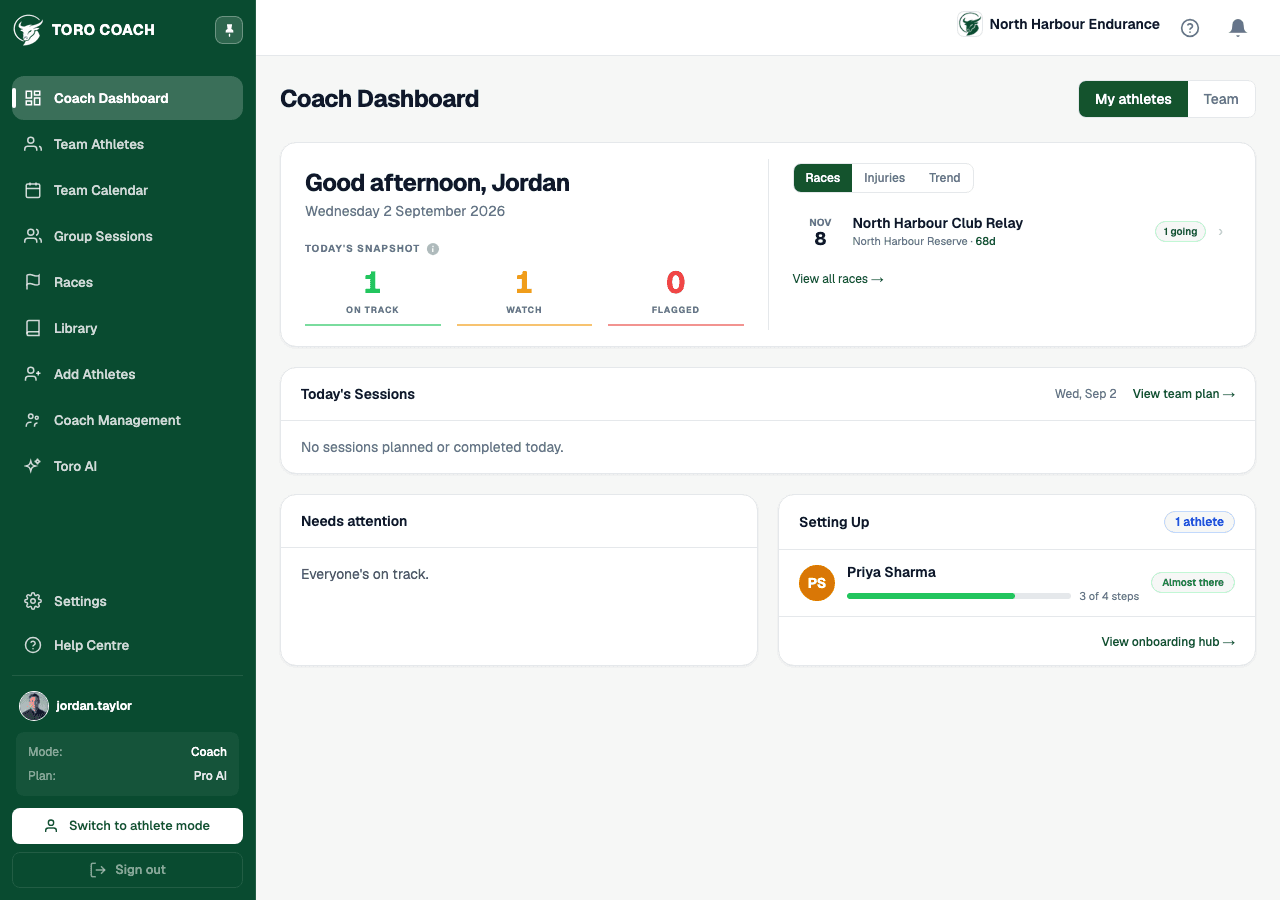
Trend, Races, and Injuries tabs
A tabbed panel next to the snapshot covers three things at a glance: your squad’s health trend over recent days, upcoming organisation races with how many athletes are attending, and any currently active injuries across the roster.
Today’s Sessions
A dedicated card lists every athlete with a session scheduled today, so you can see the day’s training load across the whole squad without opening Team Plan.
Needs attention and Setting up
- Needs attention lists every athlete currently on Watch or Flagged (excluding anyone still mid-onboarding) — open one directly from here to see their full profile.
- Setting Up lists athletes who haven’t finished onboarding yet, with a progress bar and step count; open it to jump to the onboarding hub.
- When every athlete is fully set up and on track, both cards show a calm empty state instead of a list.
Use signals, then use judgement
Dashboard indicators help you prioritise. They do not replace direct athlete communication or professional coaching judgement.